Oracle HCM · 2025–2026

Employee Communities: Find, Join & Create

Role
Co-Designer
Team
Monica Arriga (Co-designer), Design Leadership, PM, Dev
Product area
HCM Communicate
Type
Enterprise UX · Redwood

My contributions

Employee Communities gives people a place to find, join, and create communities inside their organization — spaces built around a shared interest, team, or cause, where they can post, run events, and manage members. I joined mid-project as a co-designer, while the requirements were still high-level, and took ownership of the employee-facing experience end to end — how people join a community, and how they create one.

My job was translation: turning early, incomplete requirements into complete flows a team could build. I resolved the open questions around states, entry points, and the empty-state create experience, all within Oracle's Redwood design system. The flows I defined shipped as V1, and I've stayed on the product as it's grown.

Information architecture

With the team, I helped map the information architecture — how an employee moves from their entry points (the Communications & Events Hub, Connections, and Search) into a community, and out to everything it supports: posts, events, member management, registration, and HR messages. It's what keeps the space coherent and findable as it grows.

Information architecture diagram for Employee Communities, mapping the employee entry point through hubs to transactional pages like create post, create event, and event registration.
Information architecture developed collaboratively with the team. (Diagrams use the product's original name, “Hubs,” later renamed Employee Communities.)

A place for employees to find their people

Big organizations are full of groups that never quite find each other — people who share a role, an interest, or a cause. Employee Communities gives them a home inside the HCM platform: somewhere to discover communities that fit, join in one action, and create a new one when it doesn't exist yet. Since it lives inside tools people already use for work, it had to feel native to that environment — but inviting enough that joining felt like a choice, not a task.

Employee Communities discovery page showing 1,205 communities as recommended cards with member counts, last activity, categories, search, filters, and a Create button.
The shipped discovery experience — where an employee browses, filters, and searches across communities to find ones that fit. This is where the seeker's journey begins.

The challenge: a new space, a fuzzy brief

I joined to help a team that needed another designer, in a product area I hadn't worked in before — so I was learning the domain and the in-flight project at once. The early requirements described what the product should roughly do, not how it should work: no settled flow for joining a community, and no defined path for creating one.

That meant getting oriented fast, asking the questions no one had answered yet, and making decisions while still learning the space — turning ambiguity into something buildable instead of waiting to feel like an expert first.

What I inherited
  • High-level requirements, no defined flow
  • "Join & create communities" — but how?
  • Open questions on states & entry points
  • No end-to-end journey mapped
What I defined
  • A complete join flow, start to finish
  • A create flow from an empty state
  • Resolved states, edge cases & entries
  • A coherent journey, ready to build

Starting point: the PM's user flow

My PM gave me a user flow mapping the logic — the creation path (gated by creator privilege) and the non-member journey of finding a community, reviewing it, and joining. I took that as my input and translated it into resolved states, entry points, and the actual screens employees would move through. Here's that logic, redrawn.

Decision logic from my PM's flow, redrawn — I designed the end-to-end experience from it.

Who I designed for

Every decision traced back to two employees with different intentions. The join flow serves one, the create flow serves the other — and keeping both in view is what kept the experience grounded.

The community seeker

“As an employee, I want to stay informed about team and company updates, so that I can better understand the workplace culture and connect with colleagues who share my interests.”

The community creator

“As an employee, I want to bring together like-minded peers and foster meaningful connections, so that I can help cultivate belonging and inclusion within our workplace community.”

Two journeys: join and create

The experience came down to two journeys, one for each goal. I designed each as a complete path — including the states the original requirements hadn't accounted for.

Join a community
For the employee looking to belong.
Discover communities that fit
Review what the group is about
Join with a single, low-friction action
Land inside as a member
Create a community
For the employee whose group doesn't exist yet.
Start from a clear empty-state entry
Define the community's purpose
Set it up within platform guardrails
Publish — live for others to join

The create flow was the harder of the two. It meant designing from an empty state and giving an everyday employee — not an admin — enough structure to stand up something new without overwhelming them. That balance is where most of the ambiguity lived, and where most of my decisions got made.

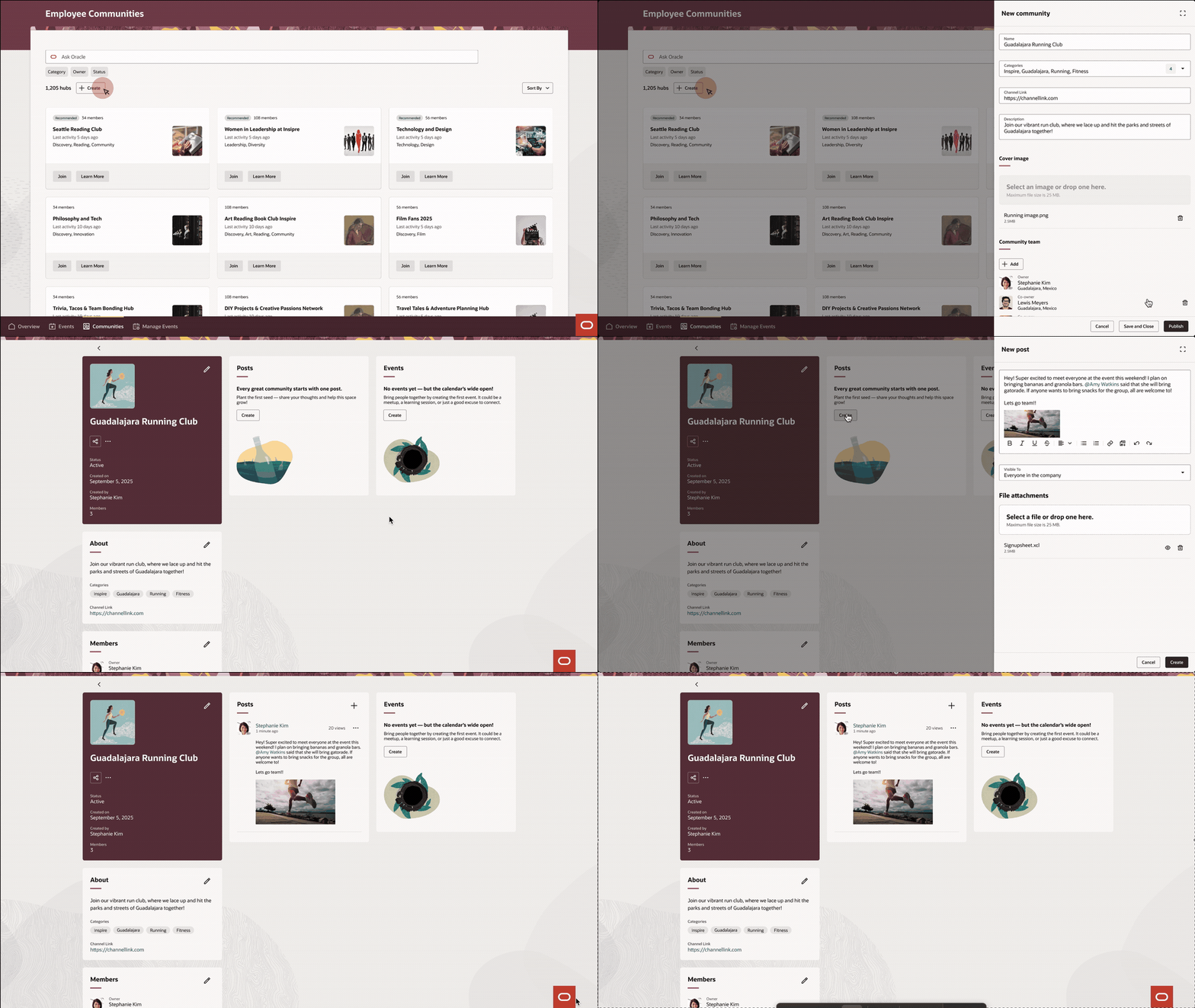
Animated walkthrough of an employee creating a community: opening the New Community panel, naming it, adding categories, description, cover image and team members, then publishing the finished community page.
The create flow, end to end — from the “New community” panel through naming, categories, cover image, and team members, to the published page and its first post. The empty-state-to-live arc I owned.
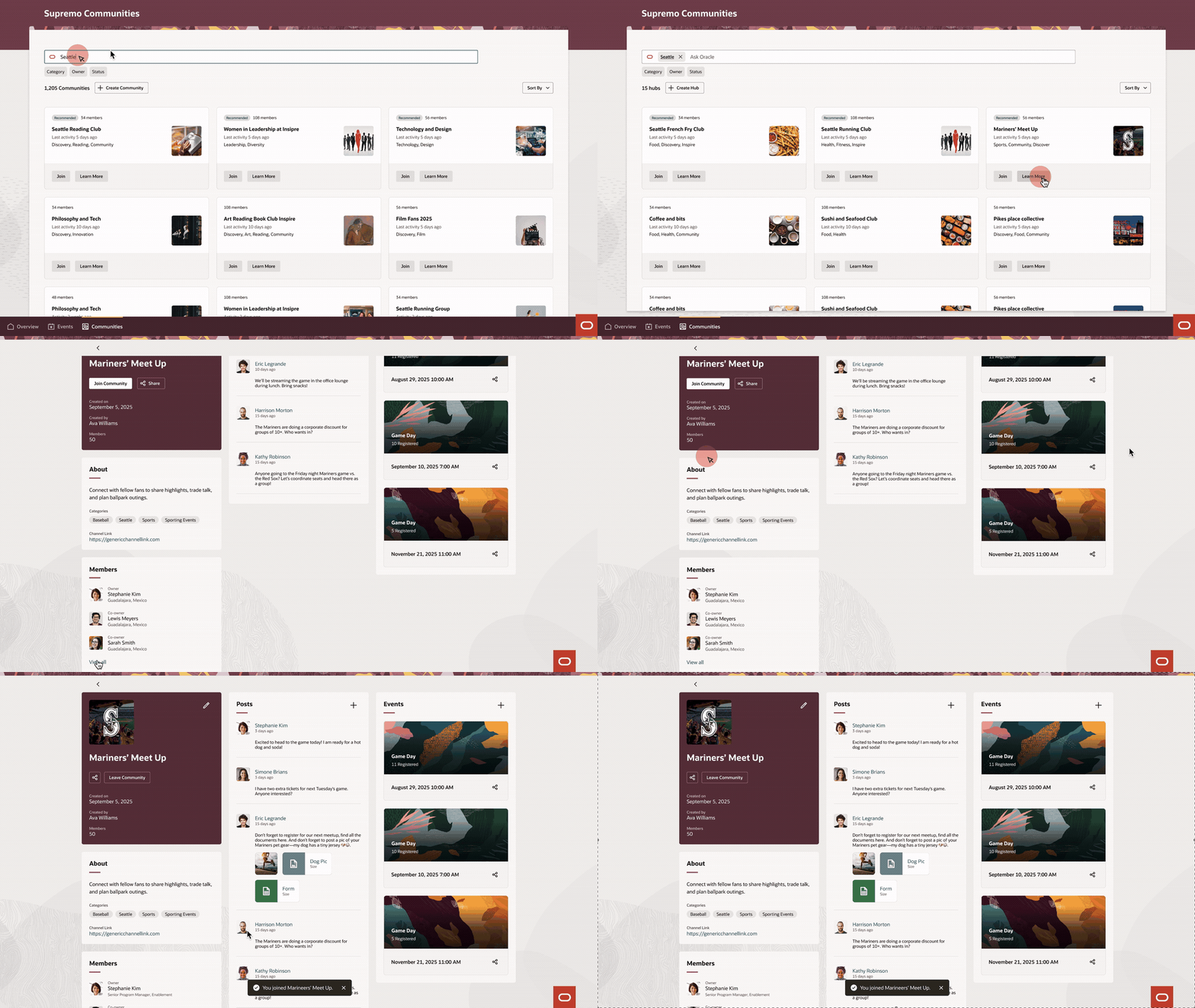
Animated walkthrough of an employee searching and filtering communities, opening a community to review its about, posts, events and members, and joining it.
The seeker's journey, end to end — searching and filtering, reviewing a community's details, members, posts and events, then joining. The find-to-belong path.

Designing within Redwood

Here the constraint was the point: every screen had to live inside Oracle's Redwood design system. The work wasn't inventing components — it was composing existing patterns into a new experience the system didn't have yet, while keeping it consistent with everything else employees use.

Designing within a mature design system is a different discipline from building one — the craft is respecting the rules while still solving a new problem. It's the same skill I use daily across Oracle's Workforce Management modules.

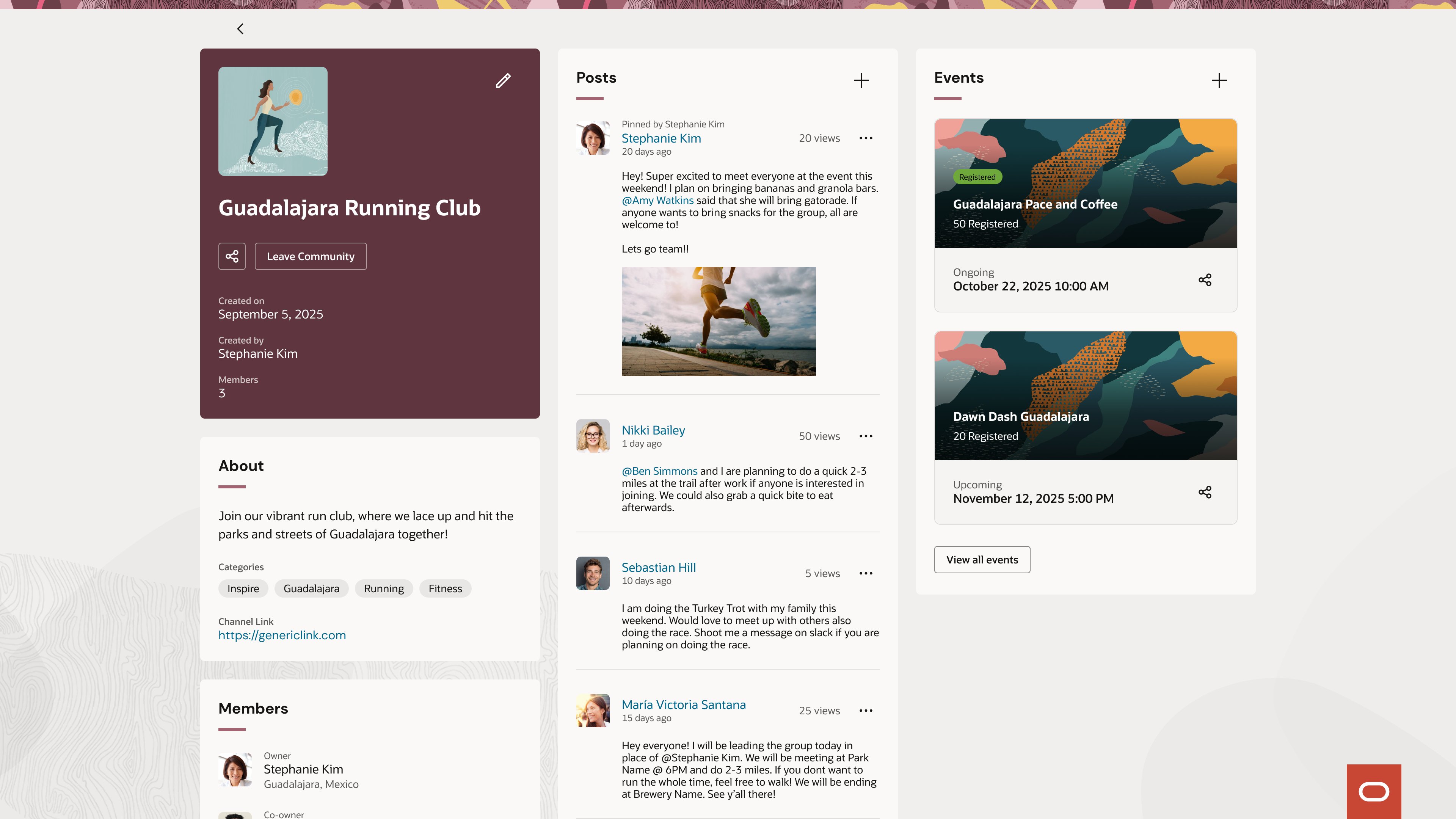
A published community page (Guadalajara Running Club) showing a three-column Redwood layout: community details, About and Members on the left, a Posts feed in the middle, and Events on the right.
A published community page, built entirely from Redwood patterns — community info, About and Members, a Posts feed, and Events — assembled into something the system didn't have before.

Outcome & what's next

The flows I defined shipped as the V1 employee experience, and I've stayed on the product as it's grown. I'm now designing a polls feature for Employee Communities — a lightweight way for members to gather input and spark participation, extending the experience I helped define into a new kind of interaction.

The project sharpened one strength in particular: a lot of design value gets made before the first polished screen — in taking a vague requirement, in an unfamiliar domain, and deciding what it actually means. Getting oriented fast, asking the right questions, and making decisions in ambiguity, all inside a strict design system. It's the combination enterprise teams rely on, and the one I lean on most today.